

SMILのレイアウトとリージョン
次の例では、同じ3つの.jpgファイルに基づいて、プレゼンテーションデザインの詳細により重点を置いたSMILドキュメントを生成します。SMILプレゼンテーションを制御するデザイン要素は次のとおりです。
layout要素は、各要素をドキュメント本体の抽象レンダリングレイヤー上にどのように配置するかを決定します。root-layout要素は、サイズや背景色といったウィンドウプロパティを決定します。SMILドキュメントにはroot-layout要素が1つだけ含まれていることが必要です。そうでないと、ドキュメントがエラーを引き起こし、表示されません。
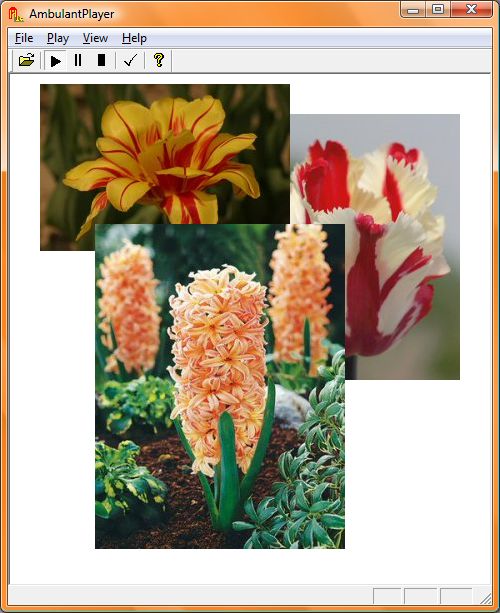
region要素は、メディアオブジェクト要素の位置(left、top)、背景色、サイズ(width、height)、さらにはz-indexを決定します。図5はブラウザで次のコードを実行した結果を示しています。
<?php

header ("Cache-Control: no-cache, must-revalidate");
header("Expires: Mon, 29 Jul 2000 07:00:00 GMT");
header ("Content-Type: application/smil");
header('Content-Disposition: attachment; filename="flower_slide_show.smil"');

?>

<!DOCTYPE smil PUBLIC "-//W3C//DTD SMIL 2.l//EN"
   "http://www.w3.org/2005/SMIL2l/SMIL2l.dtd">

<smil xmlns="http://www.w3.org/2005/SMIL21/Language">
<head>
<layout>
   <root-layout width="480" height="510"
     backgroundColor="white" />
     <region id="regl" left="30" top="10"
       width="250" height="167" z-index="2"
       backgroundColor="white" />
     <region id="reg2" left="200" top="40"
       width="250" height="266" z-index="1"
       backgroundColor="white" />
     <region id="reg3" left="85" top="150"
       width="250" height="325" z-index="3"
       backgroundColor="white" />
</layout>
</head>
<body>
<par>

<img src="flower1.jpg" region="regl" begin="1s" fit="meet" dur="indefinite" />
<img src="flower2.jpg" region="reg2" begin="2s" fit="meet" dur="indefinite" />
<img src="flower3.jpg" region="reg3" begin="3s" fit="meet" dur="indefinite" />

</par> </body> </smil>
図5 スライドショープレゼンテーション: AmbulantPlayerで開いたスライドショープレゼンテーションの最後の画面