


ポートレットの開発
ポートレットを開発するには、まず標準的なJavaプロジェクトを作成します。これをポートレットプロジェクトにするには、portlet.xmlファイルを作成します。このファイルは、コンテナで使用可能なポートレットと、それらをインスタンス化するために使用するクラスを定義する、デプロイメントデスクリプタです。ただし、ポータルがポートレットを登録し認識する方法については仕様に定義されていません。
※著者注
本稿のサンプルでは、Java Springフレームワークを使用しました。このフレームワークには、ポートレットAPIに対する作業を簡素化するための、便利なユーティリティやコンテナビーンが提供されています。筆者は、ポートレットプロジェクトの設定にEclipse IDEも使用しました。しかし、ポートレットをJSR 168またはJSR 286に準拠して作成すれば、これに準拠する任意のコンテナ上で動作させることができるため、本稿のサンプルのコーディングやビルドにこれと同じ技術を用いる必要はありません。
図5に、サンプルポートレットプロジェクトの構造を示します。
図5 ポートレットプロジェクトの構造:この図は、サンプルポートレットプロジェクトの構造を示す
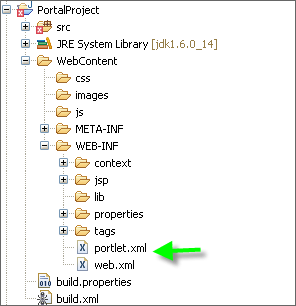
このサンプルプロジェクトのportlet.xmlファイルでは、次のように1つのポートレットを定義します。
<?xml version="1.0" encoding="UTF-8"?>
<portlet-app xmlns=
  "http://java.sun.com/xml/ns/portlet/portlet-app_1_0.xsd"
  xmlns:xsi="http://www.w3.org/2001/XMLSchema-instance"
  xsi:schemaLocation=
    "http://java.sun.com/xml/ns/portlet/portlet-app_1_0.xsd"
    version="1.0">
    <portlet>
      <portlet-name>QuickSearch</portlet-name>
      <portlet-class>
        org.springframework.web.portlet.DispatcherPortlet
      </portlet-class>
      <init-param>
        <name>contextConfigLocation</name>
        <value>/WEB-INF/context/portlet/QuickSearchDefinition.xml</value>
      </init-param>
      <supports>
        <mime-type>text/html</mime-type>
        <portlet-mode>view</portlet-mode>
      </supports>
      <portlet-info>
        <title>Quick Search</title>
      </portlet-info>
    </portlet>
</portlet-app>
上のportlet.xmlファイルでは、Springクラスの初期化パラメータとしてcontextConfigLocationを指定しています。
リスト1に、SpringのcontextConfigLocationファイルのサンプルを示します。
リスト1 QuickSearchDefinition.xml:SpringのcontextConfigLocationファイル
<?xml version="1.0" encoding="UTF-8"?>
<beans xmlns="http://www.springframework.org/schema/beans"
  xmlns:xsi="http://www.w3.org/2001/XMLSchema-instance"
  xmlns:aop="http://www.springframework.org/schema/aop"
  xsi:schemaLocation="
   http://www.springframework.org/schema/beans
   http://www.springframework.org/schema/beans/spring-beans-2.0.xsd
   http://www.springframework.org/schema/aop
   http://www.springframework.org/schema/aop/spring-aop-2.0.xsd

  <bean id="quickEntitySearchController"
    class="com.portlet.controller.QuickSearchController"
    parent="basePageController">
    <property name="sessionForm"><value>true</value></property>

    <!-- Keep command object throughout session -->
    <property name="commandName" value="commandObject"/>
    <property name="commandClass"
      value="com.portlet.command.commandObject"/>
    <property name="formView"><value>quick.search</value></property>
    <property name="successView"><value>quick.search</value></property>
    <property name="bindOnNewForm"><value>true</value></property>
    <property name="quickServiceClient" ref="quickServiceClient"/>
  </bean>

  <bean id="portletModeParameterHandlerMapping" class="
    org.springframework.web.portlet.handler.
    PortletModeParameterHandlerMapping">
    <property name="order" value="10"/>
    <property name="interceptors">
      <list>
        <ref bean="parameterMappingInterceptor" />
      </list>
    </property>

    <property name="portletModeParameterMap">
      <map>
        <entry key="view">
          <map>
            <entry key="basePageAction">
              <ref bean="quickSearchController"/>
            </entry>
          </map>
        </entry>
      </map>
    </property>
  </bean>

  <bean id="portletModeHandlerMapping" class=
    "org.springframework.web.portlet.handler.PortletModeHandlerMapping">
    <property name="interceptors">
      <list>
        <ref bean="parameterMappingInterceptor" />
      </list>
    </property>
    <property name="portletModeMap">
      <map>
        <entry key="view"><ref bean="quickSearchController"/></entry>
      </map>
    </property>
  </bean>
</beans>
