


まずはCoreをつくる
今回はGUIに依存しないコアの部分を作成します。
プラグイン・プロジェクトの作成
まずはGUIに依存しない、コアのプラグインを作ります。Eclipseのウィザードで[プラグイン開発]-[プラグイン・プロジェクト]を選択します。
- プラグイン・プロジェクトのページ
- [プロジェクト名]は「nu.mine.kino.plugin.google.core」
- [プラグインのフォーマット]のEclipseのバージョンは「3.1」
- [OSGiバンドル・マニフェストを作成]にチェックを入れます
プラグイン・プロジェクトのページ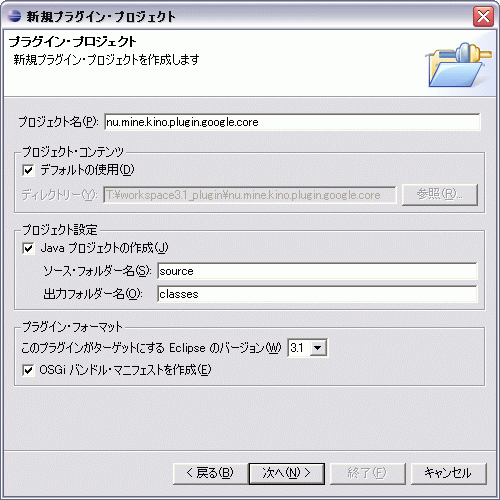
- プラグイン・コンテンツのページ
- [プラグインのプロパティ]はそのまま
- [プラグイン・クラス]は、[プラグインのライフ・サイクルを制御するJavaクラスを作成]はチェック、[このプラグインをUIに追加]はチェックを外します。
- [クラス名]は「nu.mine.kino.plugin.google.core.GoogleCorePlugin」
- リッチ・クライアント・アプリケーションの作成は[いいえ]を選択します。
プラグイン・コンテンツのページ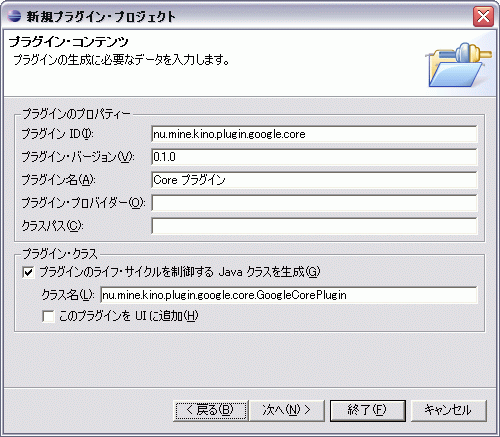
[終了]をクリックします。以上でプラグインのプロジェクトが作成できました。
Proxyをソースディレクトリに配置
先に作成しておいたProxy(nu.mine.kino.googleapisパッケージのソースコード)のソースをソースディレクトリに置いておきます。
plugin.xml、MANIFEST.MFを記述する
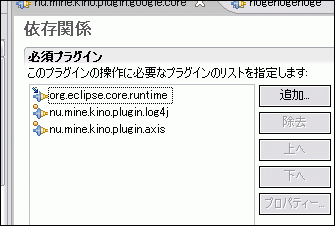
作成したプラグイン・プロジェクトに設定を追加していきます。作成したプロジェクトの「META-INF/MANIFEST.MF」をマニフェストエディタで開きます。依存関係タブを開いて、以下のプラグインを必須プラグインに追加しておきます。
- org.eclipse.core.runtime
- nu.mine.kino.plugin.axis
- nu.mine.kino.plugin.log4j
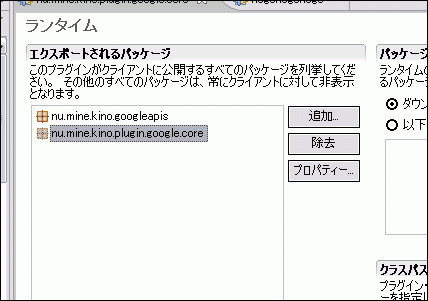
次にランタイムタブを開いて、エクスポートされるパッケージに、
- nu.mine.kino.googleapis
- nu.mine.kino.plugin.google.core
を追加しておきます。
そのほか、プラグイン名やバージョンなど多少変更していますが、結局「MANIFEST.MF」は次のようになりました。
Manifest-Version: 1.0
Bundle-ManifestVersion: 2
Bundle-Name: %pluginName
Bundle-SymbolicName: nu.mine.kino.plugin.google.core
Bundle-Version: 0.1.0
Bundle-Activator: nu.mine.kino.plugin.google.core.GoogleCorePlugin
Bundle-Localization: plugin
Require-Bundle: org.eclipse.core.runtime,
 nu.mine.kino.plugin.log4j,
 nu.mine.kino.plugin.axis
Eclipse-AutoStart: true
Bundle-Vendor: %providerName
Export-Package: nu.mine.kino.googleapis,
 nu.mine.kino.plugin.google.core
プラグインにビジネスロジックを実装する
このプラグインで必要なビジネスロジックはGoogleの検索機能を呼び出す事ですが、Google Web APIsはスペルチェックを行う便利な機能があるので、
- 指定した文字列に対してスペルチェックを行い、候補の文字列を返してくれるメソッド
getSpellingSuggestion - 指定した文字列を用いて、Google検索を行うメソッド
search
を実装したいと思います。メソッドのインターフェイスは次のようにしました。
public String getSpellingSuggestion(String myGoogleKey, String text)
public GoogleSearchResult search(String myGoogleKey, String searchText)
このメソッドをプラグインクラスnu.mine.kino.plugin.google.core.GoogleCorePluginに実装していきます。
まずはログ出力用を行うクラスLoggerと、Google検索を行うサービスインターフェイスGoogleSearchPort_PortTypeをフィールドに定義します。
private static final Logger logger
    = Logger.getLogger(GoogleCorePlugin.class);
private GoogleSearchPort_PortType googleSearch;
検索メソッドやスペルチェックメソッドの実装は次のとおりです。
/**
 * 引数の文字列でGoogle検索を行います。
 * エラーが発生した場合nullが返るか、例外を投げます。
 *
 * @param myGoogleKey Googleのキー
 * @param searchText 検索文字列
 * @return GoogleSearchResult
 * @throws CoreException 何らかのエラーが発生したとき。
 */
public GoogleSearchResult search(String myGoogleKey, String searchText)
        throws CoreException {
    logger.debug("search(String) - start");
    GoogleSearchResult result = null;
    if (googleSearch != null) {
        try {
            result = googleSearch.doGoogleSearch(myGoogleKey, searchText,
                    0, 10, false, "", false, "lang_ja", "", "");
        } catch (RemoteException e) {
            logger.error(e);
            log(e);
            IStatus status = new Status(IStatus.ERROR, getPluginId(),
                    IStatus.ERROR, e.toString(), e);
            throw new CoreException(status);
        }
    }
    logger.debug("search(String) - end");
    return result;
}
/**
 * 引数の文字列にスペルミスがないかをチェックするメソッドです。
 * スペルミスがある場合、候補を返します。スペルミスがない場合、nullが返ります。
 *
 * @param myGoogleKey
 * @param text
 * @return
 */
public String getSpellingSuggestion(String myGoogleKey, String text) {
    logger.debug("getSplellingSuggestion(String, String) - start");

    String suggestionText = null;
    try {
        suggestionText =
            googleSearch.doSpellingSuggestion(myGoogleKey,text);
    } catch (Exception e) {
        // 文字によっては例外が発生するので、その場合は
        // とりあえず候補がなかったことにして通り過ぎちゃう
        logger.warn(e);
        logger.warn("スペルミス補正でエラーが発生しました。");
    }
    logger.debug("getSplellingSuggestion(String, String) - end");
    return suggestionText;
}
またログ出力用のメソッドやプラグインIDを返すメソッドを追加します。
public static void log(String message, Exception e) {
    IStatus status = new Status(IStatus.ERROR, getPluginId(),
            IStatus.ERROR, message, e);
    getDefault().getLog().log(status);
}

public static void log(String message) {
    log(message, null);
}

public static void log(Exception e) {
    StringWriter stringWriter = new StringWriter();
    e.printStackTrace(new PrintWriter(stringWriter));
    String message = stringWriter.getBuffer().toString();
    log(message, e);
}
public static String getPluginId() {
    return getDefault().getBundle().getSymbolicName();
}
続いて、startメソッドでサービスインターフェイスを取得するようoverrideします。
public void start(BundleContext context) throws Exception {
  logger.debug("start(BundleContext) - start");
  super.start(context);

  // Web Services Proxyの取得
  try {
      GoogleSearchServiceLocator locator =
          new GoogleSearchServiceLocator();
      googleSearch = locator.getGoogleSearchPort();
  } catch (ServiceException e) {
      logger.error(e);
      log(e);
  }
  logger.debug("start(BundleContext) - end");
}
以上で、プラグインクラスにビジネスロジックを定義することができました。
