


サンプルスクリプト:ターゲットごとの解説(2/2)
VssCheckoutFilesターゲット
VssCheckoutFilesターゲットは、ファイルリストに存在する「AssemblyInfo.cs」をチェックアウトします。
VssCheckoutFilesターゲット 処理の流れ
- 編集対象のファイルをチェックアウトするディレクトリを作成します。VSSのローカル作業ディレクトリにあたります。
fileListプロパティで指定されたファイルリスト中にある各行について、パスが「$」で始まっている行のファイルに対してのみ、3.~4.の処理を繰り返します。- VSS DBでの「AssemblyInfo.cs」ファイルのパスおよび、ファイルのチェックアウト先(フルパス)を指定します。
- vsscheckoutタスクを用いてチェックアウト処理を実行します。
<target name="VssCheckoutFiles" depends="" > <!-- 1. --> <mkdir dir="${local.path}" /> <!-- 2. --> <foreach item="Line" in="${fileList}" property="path"> <if test="${string::starts-with(path, '$')}" > <!-- 3. --> <property name="fullfile" value="${local.path}${string::replace(string::replace(path, '/','\'), '$', '')}" /> <property name="fullpath" value="${string::substring(fullfile,
 replace(string::replace(path, '/','\'), '$', '')}" />
UpdateAssemblyInfoFilesターゲット
UpdateAssemblyInfoFilesターゲットでは、すべての「AssemblyInfo.cs」ファイルに内に記述されている、アセンブリバージョン情報を編集します。
UpdateAssemblyInfoFilesターゲット 処理の流れ
fileListプロパティで指定されたファイルリスト中にある各行について、パスが「$」で始まっている行のファイルに対してのみ、2.~4.の処理を繰り返します。- 指定された「AssemblyInfo.cs」ファイルの内容を読み込み、
asmfile.textプロパティに格納します。 asmfile.textプロパティの値に、「AssemblyVersion"」で始まる文字列がある場合、アセンブリのバージョンを編集し、asmfile.textプロパティの値を上書きします。このスクリプトでは、バージョン1.0.0.0をバージョン1.1.0.0に変更します。- 上書きされた
asmfile.textプロパティの値を、fullfileプロパティで指定されたファイルに出力します。
<target name="UpdateAssemblyInfoFiles" depends="" > <!-- 1. --> <foreach item="Line" in="${fileList}" property="path"> <if test="${string::starts-with(path, '$')}" > <!-- 2. --> <property name="fullfile" value="${local.path}${string::replace
VssCheckinFilesターゲット
VssCheckinFilesターゲットは、すべての「AssemblyInfo.cs」ファイルについて、コメント付きでチェックインします。
VssCheckinFilesターゲット 処理の流れ
fileListプロパティで指定されたファイルリスト中にある各行について、パスが「$」で始まっている行のファイルに対してのみ、2.~3.の処理を繰り返します。- VSS DBでの「AssemblyInfo.cs」ファイルのパスおよび、ファイルのローカルパス(フルパス)を指定します。
- vsscheckinタスクを用いて、チェックイン処理を実行します。
<target name="VssCheckinFiles" depends="" > <!-- 1. --> <foreach item="Line" in="${fileList}" property="path"> <if test="${string::starts-with(path, '$')}" > <!-- 2. --> <property name="fullfile" value="${local.path}${string::replace
実行結果
サンプルスクリプトを実行した結果を下図に示します。

「$/Prj1/AssemblyInfo.cs」「$/Prj2/AssemblyInfo.cs」「$/Prj2/Prj2-1/AssemblyInfo.cs」「$/Prj4/Prj4-2/AssemblyInfo.cs」の4つのファイルが更新され、VSS DBにチェックインされていることが分かります。
exListプロパティで指定したファイルである、「$/Prj3/AssemblyInfo.cs」「$/Prj4/Prj4-1/AssemblyInfo.cs」は編集対象から除外されていることが分かります。
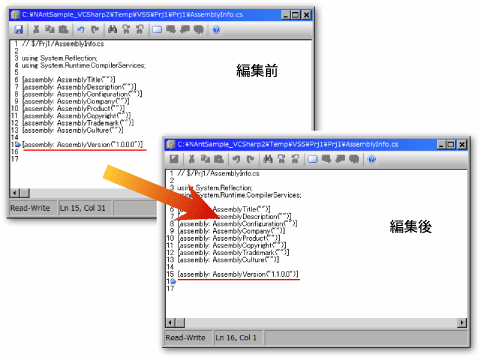
また、「AssemblyInfo.cs」ファイル内の、アセンブリのバージョンの記述部分が、「1.0.0.0」から「1.1.0.0」に変更されているのが確認できます。
まとめ
本稿では、NAnt/NAntContribを利用して、VSSに対する操作を自動化する方法について紹介しました。他にも、NAnt/NAntContribの豊富なタスクを利用して、日々のビルド作業を、自動かつ便利に行うことができます。
NAnt/NAntContribは、ビルド作業のためのツールという枠にとどまらず、さまざまな作業の効率を飛躍的に向上させる優れたツールです。ぜひ使ってみてください。

