




CAPTCHAをWebサービスから配布または呼び出す方法
Webサービスとは、URIでアドレスを指定できるソフトウェアコンポーネントである。Webサービスでは、さまざまなニッチな需要を満たす多様なサービスを提供することができる。ここでは、他のアプリケーションのためにCAPTCHA画像を提供するWebサービスの作成方法について説明する。具体的には、Webメソッドの公開、BLOB(binary large object)またはBase64エンコードデータの転送、Webメソッドの呼び出しを行うためのテクニックを紹介する。
これから説明するのはcaptchaWebServiceというWebサービスである。このWebサービスには、getCaptcha、selectWord、generateImageという3つの公開メソッド(Webメソッド)が含まれている。.NET Frameworkには、メソッドシグネチャを表すasmxファイルを調べる機能がある。invoke.aspxと同様に、このWebサービスは、画像を使ったユーザー確認を必要とするどのWebアプリケーションからでも実行できる。この機能はASP.NET以外からも利用可能である。これはWebサービスであるため、実質的にすべてのプログラミング言語およびプラットフォームに対するクロスプラットフォームサポートを提供している。
このプラットフォーム非依存のコンポーネントアーキテクチャには、もう1つ大きな利点がある。それは、CAPTCHアルゴリズムはボットに対抗して一元的に修正、拡張、強化することができ、すべてのクライアントがその恩恵を受けることができるということだ。CAPTCHAアプリケーションサービスプロバイダは、このサービスを低価格で提供してもよいし、定額制または従量制で提供してもよい。どのような形で提供するかはビジネスプロセスモデルしだいである。
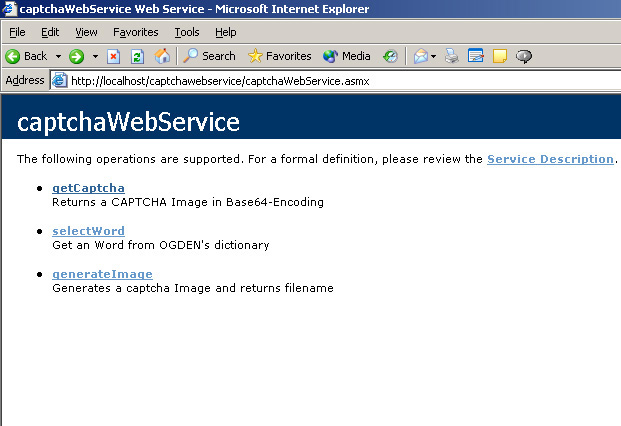
関数に関するWSDL(web service description language)ファイルについてはここを参照。このファイルには、関数シグネチャとパラメータの詳細がそれぞれのデータ型と共に記されている。
関数getCaptcha、selectWord、generateImageはそれぞれ個別に実行できるが、内部的にはお互いを呼び出しながら処理を行っている。
selectWord()
[WebMethod(Description="Get an Word from OGDEN's dictionary")]
public String selectWord ()
このWebメソッドは、既に紹介したものによく似ている。唯一異なるのは、WebMethod属性を公開して、外部から呼び出せるようにしている点だ。このメソッドは辞書データベースに接続し、次の図のようにランダムな単語を文字列として返す。

selectWord Webメソッドに関するSOAP要求および応答の詳細を見るには、ここをクリック。このメソッドはGET、POST、SOAP要求を通じて個別に呼び出すことができる。
selectWordを再度呼び出した結果は次の通り。返される単語が変わっていることに注意。

generateImage()
[WebMethod(Description="Generates a CAPTCHA Image and returns filename")]
public String generateImage ()
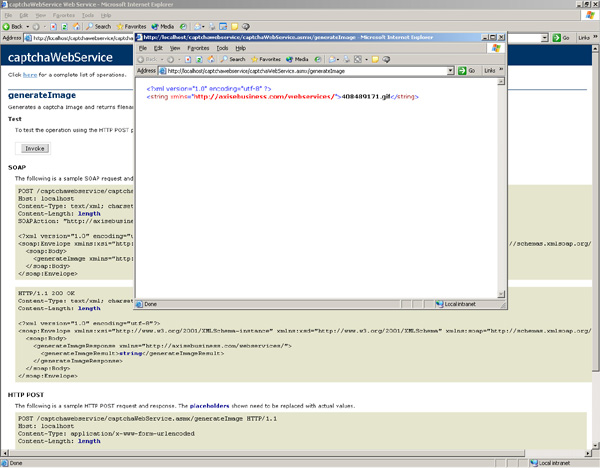
このメソッドは画像を生成し、物理的にディスクに格納する。画像の生成に成功すると、次の図のようにファイル名を返す。
getCaptcha()
[WebMethod(Description="Returns a CAPTCHA Image in Base64-Encoding")]
publicbyte[] getCaptcha()
getCaptchaは、このWebサービスの統合機能を実現するコアメソッドである。CAPTCHAの機能を必要とするアプリケーションは、このメソッドを呼び出すことになる。このメソッドは、クライアントに対して画像をストリーミングするバイト配列を返す。invoke.aspxはこのWebメソッドを呼び出して、提供されたCAPTCHAを取得する。
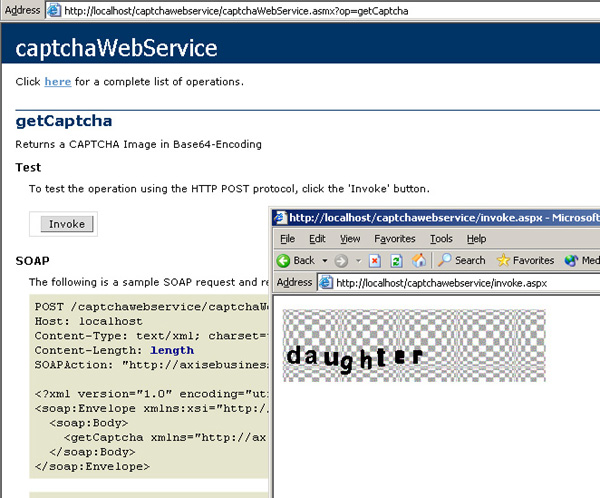
次の図は、invoke.aspxを何度か実行した結果である。さまざまな種類のCAPTCHA画像が描画されることに注目してほしい。
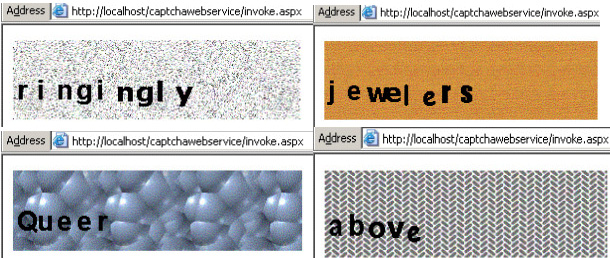
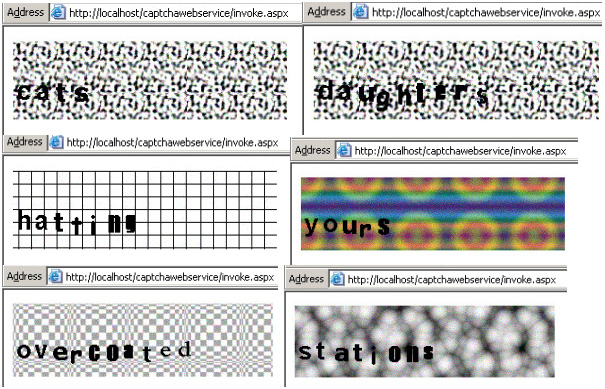
本稿ではこのWebサービスのすべてのソースコードを提供しているので、自由に実装したり、試したりしてほしい。ただし、このサンプルではプロキシクラスとアセンブリをprocess.batで生成している。これは、Visual Studio.NETを使わずにプロキシクラスを生成する人にとっては便利な方法である。このプロセスは次のようになる。
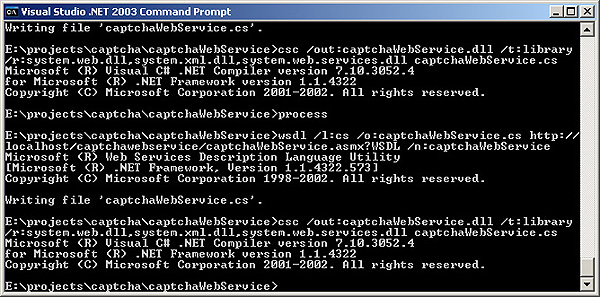
次にprocess.bat、invoke.aspx、captchaWebService.asmxのコードリストを示す。コードの詳細についてはコメントを見てほしい。
wsdl /l:cs /o:captchaWebService.cs http://localhost/captchawebservice/captchaWebService.asmx?WSDL/n:captchaWebService csc /out:captchaWebService.dll /t:library /r:system.web.dll,system.xml.dll,system.web.services.dll
 /n:captchaWebService
csc /out:captchaWebService.dll /t:library /r:system.web.dll,system.xml.dll,system.web.services.dll
/n:captchaWebService
csc /out:captchaWebService.dll /t:library /r:system.web.dll,system.xml.dll,system.web.services.dll<%@ Page Language="c#" debug="True" %> <%@ Import namespace="captchaWebService" %> <script language="c#" runat="server"> publicvoid Page_Load(System.Object sender,System.EventArgs e) { Page.Response.BinaryWrite(new captchaWebService().getCaptcha()); } </script>
<%@ webservice class="captchaWebService" language="c#" %> using System; using System.Collections; using System.ComponentModel; using System.Data; using System.Diagnostics; using System.Web; using System.Web.Services; using System.IO; using System.Data.OleDb; using System.Drawing; using System.Drawing.Imaging; ///<summary> /// This is the basic Service for CAPTCHA provision. ///</summary> [WebService(Namespace="http://axisebusiness.com/webservices/")] publicclass captchaWebService : System.Web.Services.WebService { [WebMethod(Description="Returns a CAPTCHA Image in Base64-Encoding")] publicbyte[] getCaptcha() { return getBytesFromRaster(Server.MapPath(generateImage())); } // Returns byte from Image file publicbyte[] getBytesFromRaster(string filename) { if(File.Exists(filename)) { try { FileStream s =File.OpenRead(filename); byte[] bytes = newbyte[s.Length]; s.Read(bytes, (int)0, (int)s.Length); return bytes; } catch(Exception e) { returnnewbyte[0]; } } else { returnnewbyte[0]; } } [WebMethod(Description="Generates a CAPTCHA Image and returns filename")] public String generateImage () { //Reading the parameter from session this time String strText = selectWord ();// = Session("param") //Create the memory map Bitmap raster; System.Drawing.Imaging.PixelFormat pixFormat =
まとめ
CAPTCHAは「Completely Automated Public Turing Test to Tell Computers and Humans Apart(コンピュータと人間を区別する完全に自動化された公開チューリングテスト)」の略であり、人間のふりをする自動ボットやインテリジェントエージェントからデジタル資産を守るためのテストである。この戦いは今後も続いていくだろう。CAPTCHAを破るためには、洗練されたアプリケーションと、より高度なOCR機能による、機械の「視覚」が新たな進化を遂げる必要がある。
CAPTCHAは、障害者や弱視の人には敷居の高いテストである。したがって、W3Cのアクセシビリティガイドラインに従う必要がある。
本稿は、スパムを排除するための科学的ソリューションに焦点を当てた記事シリーズの第1弾である。本シリーズの第2弾では、C#.NETでベイズ式テキスト分類APIライブラリを開発する方法について取り上げる。シリーズ最後となる第3弾では、そのベイズ式テキスト分類ライブラリを使用して、Webサービスを使ったスパムフィルタを実装してみる。読者の皆さんもぜひ実際に試していただきたい。
デモ
このページからデモを体験できる。
参考資料
- CAPTCHAホームページ
- Breaking a visual CAPTCHA Greg Mori and Jitendra Malik, UC Berkeley Computer Vision Group
- [Telling Humans & Computers apart (to appear in CACM)[[http://www.cs.cmu.edu/~biglou/captcha.pdf]]
- CAPTCHA:Using Hard AI Problems for Security (Eurocrypt)
- Protect Your Online Forms By John Clyman
- CAPTCHA-ing the Spammer By Cade Metz
ニュース
- Human or Computer? Take This Test, The New York Times, December 10, 2002.
- Up to the Challenge: Computer Scientists Crack a Set of AI-Based Puzzles, SIAM News, November 2002.
- Robot solves Internet robot problem By Byron Spice, Pittsburgh Post-Gazette, October 21, 2001
- Computer or Human? New Programs can tell By Matt O'Brien, University of Miami Newspaper, November 20, 2001
- Can Hard AI Problems Foil Internet Interlopers? By Sara Robinson, SIAM News, April 2002
- Researchers battle e-mail stealing Web bots with identity checks By Mike Crissey, The Associated Press, December, 2002
- Computer Pioneer Aids Spam Fight, The BBC News, January, 2003
- Recognizing Objects in Adversarial Clutter: Breaking a Visual CAPTCHA (2003) Greg Mori, Jitendra Malik
チューリングテスト
- A. M. Turing (1950) Computing Machinery and Intelligence. Mind 49: 433-460.
- The Turing test page
- Alan Turing Homepage
- AI Glossary - Syracuse University
- Technical Solutions for Controlling Spam
- BaffleText:a Human Interactive Proof
- Gimpy High Level Description
- Gimpy Paper
- Telling Humans and Computers apart OR How Lazy Cryptographers do AI
関連団体
- Computer Science Dept., Carnegie Mellon University, Pittsburgh
- The UC Berkeley Computer Vision Group
- Shape Matching and Object Recognition
- Detecting Natural Image Boundaries
- British Computing Society Artificial Intelligence Group
その他
- Yahoo!でのEZGimpyの使用例
- Practical A.I. - Introduction - Ben Garcia
- Web Methods returning something else than XML?
- Sapience Validation(XML RPCベースのサービス)
- View the Real World in Your Application, with TerraServer, by Karl Moore
- CityView App: Build Web Service Clients Quickly and Easily with C#, MSDN Magazine
- Demonstration of using Base64 encoding, in a Web Service using the .NET Framework, by Robert Chartier
- Baffling the Bots, by Lee Bruno
ボット関連のWebサイト
- http://www.runabot.com/
- http://www.activebuddy.com/
- http://members.aol.com/adamkb/aol/imbots
- http://www.pandorabots.com/pandora
- Botspot
- How to build a Bot Trap and keep bad bots away from a web site
- Robot Exclusion
- Computer Vision and Image Understanding: Palo Alto Research Center
- Stopping Spambots:A Spambot Trap
- SECURITY and CRYPTOGRAPHY 15-827 Lecture #17
- OGDEN's BASIC ENGLISH
- Base64 content-Transfer-encoding
- CAPTCHAについて初めて言及した論文:
- Conf.On Document Analysis & Recognition, Seattle, WA, Sept. 10-13, 2001.
- ImageMagik: Image Manipulation API
- Securing passwords against dictionary attacks
