SHOEISHA iD

※旧SEメンバーシップ会員の方は、同じ登録情報(メールアドレス&パスワード)でログインいただけます

DeveloperZine(デベロッパージン)- エンジニアの意思決定を支える技術情報メディア ProductZine

CodeZine編集部では、現場で活躍するデベロッパーをスターにするためのカンファレンス「Developers Summit」や、エンジニアの生きざまをブーストするためのイベント「Developers Boost」など、さまざまなカンファレンスを企画・運営しています。

japan.internet.com翻訳記事

.NETとAIでスパムボットに対抗する

画像認識によるスパム対策.NET編

ダウンロード ソースコード (574.5 KB)

開発のきっかけ

 先日、視覚的な対人確認ソリューションに関する2つの記事を読んだ。1つは、『DDJ』(Dr. Dobb's Journal)2003年11月号に掲載されたPaul Tremblettの「Java 2D & Web Pages」という記事だ。この記事では、動的データを簡単に提供するための方法として、サーバーサイドJava 2DをWebアプリケーションコンポーネントに組み込むという手法を紹介していた。もう1つは、『Scientific American』2003年11月号に掲載されたLee Brunoの「Baffling the Bots」という記事である。私はこれらの記事を読んで、Webフォームを自動登録やスパムボットから保護するための.NETプラットフォーム用サンプルアプリケーションを開発しようと思い立った。

 次に紹介するのは、ボットによる自動投稿を防止するための画像生成プログラムである。Webアプリケーションに対してスパム、自動登録、フォーラムへの自動投稿、案内広告の自動投稿などが頻繁に行われる場合は、人間だけが認識できるような視覚的なCAPTCHAをWebフォームに組み込むとよい。

独自CAPTCHAアプリケーションの開発

 ASP.NETには、画像の生成・操作を行うための機能が含まれている。以前のASP 3.0とは異なり、ASP.NETは.NET Frameworkを最大限に活用することができ、外部ライブラリを使わずに動的な画像処理を行うことができる。System.Drawingクラスを使用すると、メモリ内で画像を生成し、その画像を出力ストリームを通じてブラウザ上に描画できる(このプロセスについては、次の分離コードファイル(OntheFly.aspx.vb)を参照のこと)。

 このサンプルの目的は、クエリ文字列を通じて渡されたパラメータに基づいて、画像を動的に生成することである。ビットマップ画像を描画するには、HTTPContextを使用する。これは、System.Drawing.Bitmapオブジェクトをインスタンス化するためのブラウザのストリームハンドラである。BitmapコンストラクタはpixelFormatをパラメータとして受け取り、110×50ピクセルの描画用キャンバスを返す。このプロセスはすべてメモリ内で行われ、後でpageContextがフラッシュされるときにブラウザ上に描画されるという点に注意してほしい。次に、ラスタ(つまりビットマップメモリマップ)への描画を行うグラフィックオブジェクトが必要になる。このグラフィックオブジェクトのインスタンスはFillRectangleDrawStringを呼び出して、キャンバス上に矩形とパラメータテキストを描画する。このキャンバスは、出力ストリームに対してgif MIMEタイプとしてフラッシュされる。実際に出力した画像の例を次の図に示す。
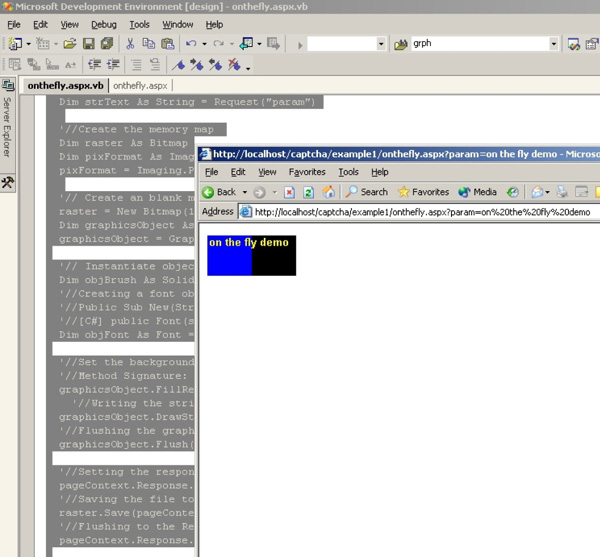
図1.19:動的な画像生成のデモ(手前はIE、後ろはVS IDE)
リスト:OntheFly.aspx.vb
'// Filename: onthefly.aspx.vb
'// Author: Adnan Masood
'// Last updated: 12/07/03
'// Importing the libraries for drawing operations
Imports System
Imports System.Drawing
'// Class OntheFly declaration
PublicClass OntheFly : Inherits System.Web.UI.Page
'//Page_Load event overriding 
PrivateSub Page_Load(ByVal sender As System.Object, ByVal e As System.EventArgs) 
    HandlesMyBase.Load
'//Getting HTTPContext
Dim pageContext As System.Web.HttpContext 
pageContext = System.Web.HttpContext.Current
'//Reading the parameter
Dim strText AsString = Request("param")
'//Create the memory map 
Dim raster As Bitmap
Dim pixFormat As Imaging.PixelFormat
pixFormat = Imaging.PixelFormat.Format32bppArgb
'// Create a memory image with dimensions 110x50
raster = New Bitmap(110, 50, pixFormat)
Dim graphicsObject As Graphics
graphicsObject = Graphics.FromImage(raster)
'// Instantiate object of brush
Dim objBrush As SolidBrush = New SolidBrush(Color.Yellow)
'//Creating a font object with Arial size 10 and bold
'//public Font(string, float, FontStyle)
Dim objFont As Font = New Font("Arial", 10, FontStyle.Bold)
'//Set the background half rectangle blue
'//Method Signature: FillRectangle (const Brush *brush, INT x, INT y, INT width, INT height);
graphicsObject.FillRectangle(New SolidBrush(Color.Blue), 0, 0, 55, 50)
'//Writing the string on image
graphicsObject.DrawString(strText, objFont, objBrush, 0, 0)
'//Flushing the graphics object
graphicsObject.Flush()
'//Setting the response header content MIME type
pageContext.Response.ContentType = "image/gif"
'//Saving the file to output stream to be displayed in browser
raster.Save(pageContext.Response.OutputStream, Imaging.ImageFormat.Gif)
'//Flushing to the Response 
pageContext.Response.Flush()
EndSub
EndClass

 OntheFly.aspx.vbは、OntheFly.aspxの分離コードファイルである。OntheFly.aspxには次の行が含まれている。

リスト:OntheFly.aspx
<%@ Page Language="vb" Src="OntheFly.aspx.vb" Inherits="OntheFly"%>

 図1.20は、出力した画像の例である。パラメータに何か文字列を指定すると、このコードによって画像が生成され、ブラウザ上に描画される。バイナリファイルの中に画像として描画されたテキストは、HTMLコードとは違って簡単に読み取ることができないため、スパムボットで何が書かれているかを判読するためには、特殊なテクニックが必要になる。この単純なサンプルを応用すれば、フォーラムやブログなどの電子メールアドレス保護機能を実現できる。キャッシュ処理を工夫すれば、パフォーマンスが大きく低下することもない。
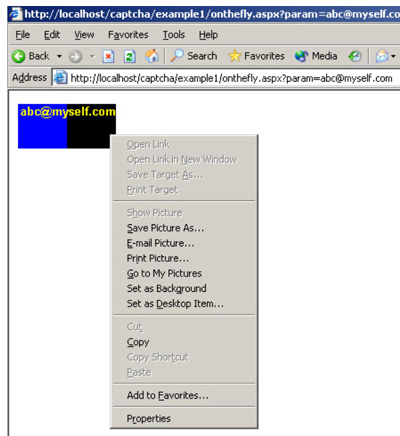
図1.20:渡されたクエリ文字列パラメータに基づいてASP.NETファイルから動的に生成した画像

辞書ベースのCAPTCHAの実装

 今度のサンプルは、本格的なCAPTCHAプログラムの機能を備えているため、先ほどのものより少し長く複雑になっている。このプログラムでは、辞書ベースのCAPTCHAを動的に生成し、画像内のテキストの入力を求めて、相手が人間かどうかの確認を行う。

 このプログラムの流れは次のとおりである。ある架空のフォーラムのログインフォームで、ユーザーが人間であるかどうかを確認するために、フォーム下部の画像内のテキストを入力するようユーザーに要求する。プログラムは、用意されているさまざまな画像の中から背景用画像を動的に選択し、「OGDEN's Basic English」辞書から選択した任意の単語と組み合わせる。OCRでの認識を難しくするために、字体も1文字ごとに変更する。以降では、このプログラムの動作を簡単に説明し、完全なコードリストと辞書データベースファイルを紹介する。
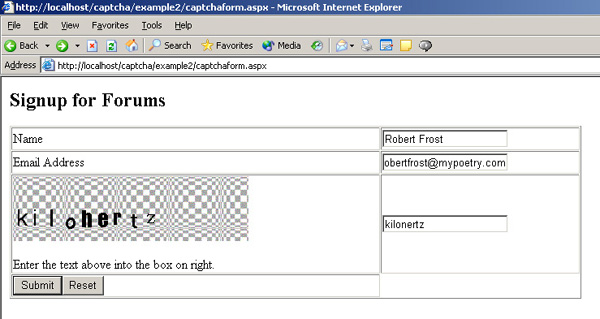
図2.1:フォーラムのログインフォームの例

 ユーザーが間違った単語を入力すると、次の画面に進むことができず、エラーメッセージが表示される。
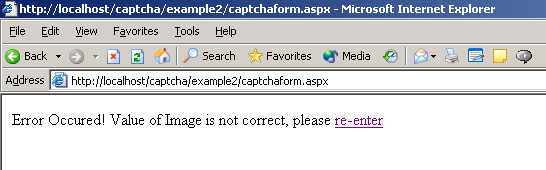
図2.2:フォーラムへのログイン時に表示されるエラーの例

 ボットが再試行しようとすると、今度は別の背景と別の単語を使用した新しい画像が表示される。

 アプリケーション設計者は、再試行を何回まで認めるかを検討しなければならない。ユーザーが再試行した回数を記録しておき、このプログラムがセキュリティ対策ではなく一般ユーザーに対する障壁になっていないかどうかを確認する必要がある。また、障害者のために、代替策(音声を使用するなど)も用意しておいた方がよい。
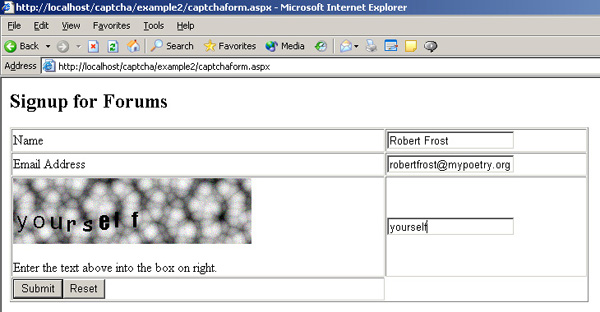
図2.3:フォーラムのログインフォームの例

 ユーザーが正しい単語を入力した場合、このプログラムはユーザーのアクセスを許可する。その前に別の処理を挿入することもできる。
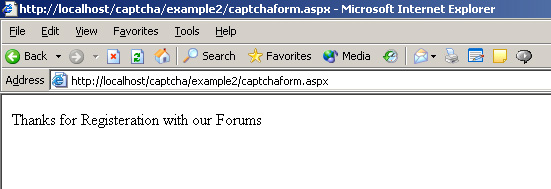
図2.4:フォーラムへのログインが成功した場合の例

 それでは、このアプリケーションの内容を詳しく見ていくことにしよう。

 次の図は、OGDENのBasic English辞書をデータベース化したものである。各列に同じアルファベットから始まる単語が収録されており、ここからCAPTCHA画像に組み込む単語をランダムに選択できる。
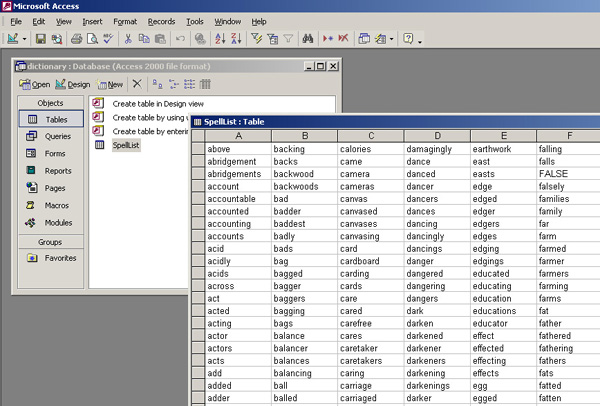
図:「OGDEN's Basic English」辞書をアプリケーション用にデータベース化したもの(dictionarydb)

 このアプリケーションには次の3つのメインファイルがある。

captchaForm.aspx

 このファイルには、辞書内の単語をランダムに選択してcaptcha.aspxに渡すためのコードが含まれている。captcha.aspxの分離コードファイルであるcaptcha.aspx.vbは、渡された単語を処理して、ブラウザ上に画像を描画する。このファイルには、フォームを処理するコードと、ユーザーが入力したCAPTCHAの値を検証するコードも含まれている。さらに、dictionary.mdbへの接続、ランダムな単語の読み取り、セッションの処理を行うコードも含まれている。

captcha.aspx.vb

 これはcaptcha.aspxの分離コードファイルである。画像生成の処理はこのファイルが担当する。このファイルはbackgroundsフォルダ内の背景パターンをランダムに選択し、captchaform.aspxから渡されたテキスト文字列を書き込む。さらに、機械による読み取りを難しくするために、字体とサイズをランダムに選択する。

dictionary.mdb

 このAccessデータベースリポジトリには、OGDENのBasic English辞書の項目が格納されている。

 各所のコメントを追っていけば、このコードでどんな処理をしているかはすぐにわかるだろう。

リスト:captchaForm.aspx
<!--
'// Filename: captchaForm.aspx
'// Author: Adnan Masood
'// Last updated: 12/08/03
-->
<%@ Import Namespace="System" %>
<%@ Import Namespace="System.Data" %>
<%@ Import Namespace="System.Data.OleDb" %>
<%@ Page Language="C#" debug=true%>
<HTML>
<head>
    <script runat="server">
    // Pageload event
void Page_Load(object Source, EventArgs E)
{
        // If form is not posted than assign the selectWord return to session 
        if (!IsPostBack)
Session["param"] =selectWord();
        // Else check if session's value is same as that of Captcha's entered value
        // in the form and assign appropriate message to innertHtml of label
else
{
if (String.Compare(Convert.ToString(Session["param"]),Convert.ToString(Request.Form["CAPTCHA"]))==0) 
            lblstatus.InnerHtml= "Thanks for Registeration with our Forums";
        else
        lblstatus.InnerHtml= "Error Occured! Value of Image is not correct, " +
                "please <a href=captchaform.aspx> re-enter </a>";
}
}
    // Select word method
    // Return type String of random word from dictionary
    // Dictionary is based on OGDEN's BASIC ENGLISH 
    // http://ogden.basic-english.org/basiceng.html
    public String selectWord () {
        
        // The Connection string referencing the MDB file
        String ConnectionString = "Provider=Microsoft.Jet.OleDb.4.0;Data Source=" 
        + Server.MapPath("dictionary.mdb") + ";";
        
        // Datareader object
        OleDbDataReader objReader;
        
        // Creating an array of 26 characters (alphabets in dictionary database as columns)
        char[] columns = newchar[26];
        
        // Adding the column names in the array
        // uses the ASCII character conversion for selecting values
        // from A- Z
        for (int a=65; a<65+26; a++)
        columns[a-65] = (char)a;
                
        // Query String for selecting a random column from spelling list database
String QuerySQL = "SELECT " + columns[(new Random().Next(26))] + " FROM spellList";
// Opening the connection
OleDbConnection objConn = new OleDbConnection(ConnectionString);
    // Creating new command object
    OleDbCommand objCmd = new OleDbCommand();
    // Assigning command text
    objCmd.CommandText = QuerySQL;
    // Assigning the connection to command object connection attribute
objCmd.Connection = objConn;
// Instantiating a random class object 
Random randomSeed = new Random();
// Creating a random seed selector
int randomSeedSelector=0;
// An string character with maximum capacity for dictionary column
String[] selectedIndex = new String[700];
String str = "";
// This code segment opens the connection and read the dictionary
try
        {
objConn.Open();
objReader = objCmd.ExecuteReader();
while (objReader.Read()) {
                str = objReader.GetValue(0).ToString();
                if (str.Length != 0) {
                    selectedIndex[randomSeedSelector] =str;
                    randomSeedSelector++;
                }
}// Ends While
str = selectedIndex[randomSeed.Next(randomSeedSelector)];
            
        } // Ends Try
catch (Exception Err)
        {
// The Error Catching operations
        }
finally
        {
objConn.Close();
        }
        // Returns the selected string
        return (str);
        
}// ends function 
    </script>
    </head>
    <body>
        <% //Checking for postback for initial processing of form.
        if (!IsPostBack) { %>
        <form runat="server">
            <P align="left"><STRONG><FONT size="5">Signup for Forums</FONT></STRONG></P>
            <P>
                <TABLE id="Table1" height="200" cellSpacing="1" cellPadding="1" width="704" border="1">
                    <TR>
                        <TD>
                            <P>Name</P>
                        </TD>
                        <TD><INPUT id="Text1" type="text" name="name"></TD>
                    </TR>
                    <TR>
                        <TD>Email Address</TD>
                        <TD><INPUT id="Text2" type="text" name="email"></TD>
                    </TR>
                    <TR>
                        <TD>
                            <P><IMG src="http://localhost/captcha/example2/captcha.aspx"></P>
                            <P>Enter the text above into the box on right.</P>
                        </TD>
                        <TD><INPUT id="Text3" type="text" name="CAPTCHA"></TD>
                    </TR>
                    <TR>
                        <TD>
                        <INPUT id="Submit1" type="submit" value="Submit" name="Submit1">
                        <INPUT id="Reset1" type="reset" value="Reset" name="Reset1">
                        </TD>
                        <TD></TD>
                    </TR>
                </TABLE>
            </P>
        </form>
        <% }
            //Setting lable's status accordingly 
            else
        { %>
        <td id="lblstatus" runat="server"></td>
        <% }%>
    </body>
</HTML>
リスト:captcha.aspx.vb
'// Filename: captcha.aspx.vb
'// Author: Adnan Masood
'// Last updated: 12/08/03
Imports System
Imports System.Drawing
Imports System.String
Imports System.Drawing.Image
namespace com.axisebusiness.OnlineImage
'// Importing the libraries for drawing operations
'// Class OntheFly declaration
PublicClass CAPTCHA : Inherits System.Web.UI.Page
'//Page_Load event overriding 
PrivateSub Page_Load(ByVal sender As System.Object, ByVal e As System.EventArgs) 
    HandlesMyBase.Load
'//Getting HTTPContext
Dim pageContext As System.Web.HttpContext 
pageContext = System.Web.HttpContext.Current
'//Reading the parameter from session this time
Dim strText AsString = Session("param") 
'//Create the memory map 
Dim raster As Bitmap
Dim pixFormat As Imaging.PixelFormat
pixFormat = Imaging.PixelFormat.Format32bppArgb
'// Select an memory image from file of 290x80px
'// in the backgrounds folder named backX.jpg
Dim graphicsObject As Graphics
Dim imageObject as System.Drawing.Image = 
    System.Drawing.Image.FromFile(Server.Mappath("backgrounds\\back" &  
    new Random().Next(5) & ".jpg"))
'// Creating the raster image object
raster = new Bitmap (imageObject)
'//Creating graphics object
graphicsObject = Graphics.FromImage(raster)
'// Instantiate object of brush with black color
Dim objBrush As SolidBrush = New SolidBrush(Color.Black)
Dim objFont As Font
dim a asInteger, myFont asString, str asString
'//Creating an array for most readable yet cryptic fonts for OCR's
'// This is entirely up to developer's discretion
dim crypticFonts(11)
crypticFonts (0) = "Arial"
crypticFonts (1) = "Verdana"
crypticFonts (2) = "Comic Sans MS"
crypticFonts (3) = "Impact"
crypticFonts (4) = "Haettenschweiler"
crypticFonts (5) = "Lucida Sans Unicode"
crypticFonts (6) = "Garamond"
crypticFonts (7) = "Courier New"
crypticFonts (8) = "Book Antiqua"
crypticFonts (9) = "Arial Narrow"
crypticFonts (10) = "Estrangelo Edessa"
'//Loop to write the characters on image
'// with different fonts.
For a=0 to strText.Length-1
myFont = crypticFonts(new Random().Next(a))
objFont = New Font(myFont, 20, new FontStyle().Bold)
str = strText.substring(a, 1)
graphicsObject.DrawString(str, objFont, objBrush, a*20, 35)
graphicsObject.Flush()
next
'//Flushing the graphics object
graphicsObject.Flush()
'//Setting the response header content MIME type
pageContext.Response.ContentType = "image/gif"
'//Saving the file to output stream to be displayed in browser
raster.Save(pageContext.Response.OutputStream, Imaging.ImageFormat.Gif)
'//Flushing to the Response 
pageContext.Response.Flush()
EndSub
EndClass
Endnamespace

 Captcha.aspxファイルには次のように記述されている。

リスト:Captcha.aspx
<%@ Page Language="C#" Src="Captcha.aspx.vb" Inherits="com.axisebusiness.OnlineImage.Captcha"%>

 お気付きのとおり、このコードは1つのプログラム内で複数の言語(この場合はC#とVB.NET)を使用する方法のサンプルでもある。このプログラムで生成したCAPTCHAは絶対に破られないとは言えないが、通常のスパムボットへの対策としてはかなり有効である。

次のページ
CAPTCHAをWebサービスから配布または呼び出す方法

この記事は参考になりましたか?

japan.internet.com翻訳記事連載記事一覧

もっと読む

この記事の著者

japan.internet.com(ジャパンインターネットコム)

japan.internet.com は、1999年9月にオープンした、日本初のネットビジネス専門ニュースサイト。月間2億以上のページビューを誇る米国 Jupitermedia Corporation (Nasdaq: JUPM) のニュースサイト internet.comEarthWeb.com からの最新記事を日本語に翻訳して掲載するとともに、日本独自のネットビジネス関連記事やレポートを配信。

※プロフィールは、執筆時点、または直近の記事の寄稿時点での内容です

Adnan Masood(Adnan Masood)

ロンドンのUKIMのソフトウェア開発者。UNW Stratford Londonキャンパスにてソフトウェア工学の理学修士号を取得。複数のソフトウェア開発技術にまたがるハイブリッド的な視野を持って開発に臨み、主にMicrosoftおよびSunプラットフォームのサーバーサイドプログラミングを専門とする。ここ5年間はASPおよびJavaの開発者として活躍。コンピュータ工学の理学士号とSun Java-II Certification(SCJP...

※プロフィールは、執筆時点、または直近の記事の寄稿時点での内容です

この記事は参考になりましたか?

この記事をシェア

CodeZine(コードジン)
https://codezine.jp/article/detail/34 2005/10/05 16:48

イベント

CodeZine編集部では、現場で活躍するデベロッパーをスターにするためのカンファレンス「Developers Summit」や、エンジニアの生きざまをブーストするためのイベント「Developers Boost」など、さまざまなカンファレンスを企画・運営しています。

新規会員登録無料のご案内

  • ・全ての過去記事が閲覧できます
  • ・会員限定メルマガを受信できます

メールバックナンバー