


Azure StorageとAzure SDKを使ってWindows Azureクラウドサービスアプリケーションを作成する
基本的な加算マシンをクラウドで構築し、アプリケーションの機能を理解する

Windows Azure Queueストレージを使用する
Work Roleにメッセージを送信するにはまず、ファイル「Default.aspx.cs」に、Queueにメッセージを追加するためのコードを挿入する必要があります。このコードは、Calculationオブジェクトを作成し、RowKeyを返したのと同じボタンクリックイベントに追加します。Worker Roleでは、計算のための正しい入力値を取得するために、PartitionKeyとRowKeyの両方が必要です。この例では、PartitionKeyが"TEST"にハードコードされているため、RowKeyのみを引き渡します。より堅牢なアプリケーションを作成するには、一意のレコードを取得するために、Worker Roleに両方の値を引き渡すことが必要になるはずです。
protected void cmdStartCalculation_Click(object sender, EventArgs e)
{
    // ...

    StorageAccountInfo accountQueueInfo =
         StorageAccountInfo.GetDefaultQueueStorageAccountFromConfiguration();

    QueueStorage qs = QueueStorage.Create(accountQueueInfo);
    MessageQueue queue = qs.GetQueue("calculations");
    if (!queue.DoesQueueExist())
         queue.CreateQueue();

    Message msg = new Message(lblCalculationKey.Text);
    queue.PutMessage(msg);
}
次に、ファイル「WorkerRole.cs」を開き、Queueストレージからのメッセージを取得し、計算を実行し、Tableストレージのエンティティを更新するコードを追加します。ファイル「WorkerRole.cs」のStartメソッドに、以下のコードを追加します。
using Microsoft.Samples.ServiceHosting.StorageClient;

// ...

public override void Start()
{
    RoleManager.WriteToLog("Information", "Worker Process entry point called");

    // Create account info objects for retrieving messages and accessing table storage
    StorageAccountInfo accountTableInfo =
        StorageAccountInfo.GetDefaultTableStorageAccountFromConfiguration();
    StorageAccountInfo accountQueueInfo =
          StorageAccountInfo.GetDefaultQueueStorageAccountFromConfiguration();

    CalculationDataServiceContext calcDSContext =
          new CalculationDataServiceContext(accountTableInfo);

    QueueStorage qs = QueueStorage.Create(accountQueueInfo);
    MessageQueue queue = qs.GetQueue("calculations");

    while (true)
    {
        Thread.Sleep(10000);

        if (queue.DoesQueueExist())
        {
            Message msg = queue.GetMessage();
            if (msg != null)
            {
                // Retrieve the Calculation entity from Table storage
                 var calc = (from c in calcDSContext.Calculations
                               where c.PartitionKey == "TEST"
                               && c.RowKey == msg.ContentAsString()
                               select c).FirstOrDefault();

                if (calc != null)
                {
                    calc.CalcValue = calc.ValueOne + calc.ValueTwo;

                    // Update the entity with the new CalcValue
                    // property populated
                    calcDSContext.UpdateObject(calc);
       calcDSContext.SaveChanges(SaveChangesOptions.ReplaceOnUpdate);

                    // Need to delete the message once processed!
                    queue.DeleteMessage(msg);
                }
            }
        }
    }
 }
これで、10秒ごとに「calculation」キューのメッセージをチェックするWorker Roleが完成しました。メッセージを検出すると、Tableストレージから該当するCalculationエンティティを取得し、計算値プロパティを更新し、Tableストレージへと再保存します。最後の重要な処理として、同じメッセージが再び取得されることのないように、メッセージをキューから削除します。
全体を組み合わせる
最後に、ユーザーが計算値を取得できるようにするためのコードを「Default.aspx.cs」に追加します。[retrieve calculation]ボタンのクリックイベントハンドラに、以下のコードを追加します。
protected void cmdRetrieveCalculation_Click(object sender, EventArgs e)
{
    // Create account info objects for accessing table storage
    StorageAccountInfo accountTableInfo =
          StorageAccountInfo.GetDefaultTableStorageAccountFromConfiguration();

    CalculationDataServiceContext calcDSContext = new CalculationDataServiceContext(accountTableInfo);

    // Retrieve the Calculation entity from Table storage
    Calculation calc = (from c in calcDSContext.Calculations
                        where c.PartitionKey == "TEST"
                        && c.RowKey == txtCalculationKey.Text
                        select c).FirstOrDefault();

    lblCalculatedValue.Text = calc.CalcValue.ToString();
    lblCalculatedValue.Visible = true;
}
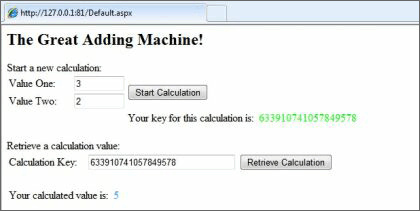
アプリケーションをデバッグすると、計算を開始し、結果を取得できるようになっていることが分かります。サービスは10秒ごとにしかキューをチェックしに行かないため、計算値を取得するまでしばらく待つ必要があることに注意してください。
まとめ
基本的な加算マシンをクラウドで構築するのは実用的とは言えませんが、本稿の例によって、クラウドサービスアプリケーションの多くの重要な機能が理解できたことと思います。本稿では、新しいクラウドサービスを作成し、Azure Storageを使用するための構成ファイルを設定し、Tableストレージを用いてデータの保存、取得、更新を行い、Queueストレージを用いてクラウドサービスのロール間でメッセージを送受する方法を示しました。また、Azure SDKに提供されているStorageClientプロジェクトを利用することにより、簡単にAzure Storageサービスを用いた開発ができることを示しました。
この記事は参考になりましたか?
既に会員の方はを行ってください。
- japan.internet.com翻訳記事連載記事一覧
- この記事の著者
-

japan.internet.com(ジャパンインターネットコム)
japan.internet.com は、1999年9月にオープンした、日本初のネットビジネス専門ニュースサイト。月間2億以上のページビューを誇る米国 Jupitermedia Corporation (Nasdaq: JUPM) のニュースサイト internet.com や EarthWeb.com からの最新記事を日本語に翻訳して掲載するとともに、日本独自のネットビジネス関連記事やレポートを配信。
※プロフィールは、執筆時点、または直近の記事の寄稿時点での内容です
-
Matt Goebel(Matt Goebel)
インディアナ州インディアナポリスにあるAP Innovation, Incの創設者兼社長。同氏への連絡は、859-802-7591またはmatt.goebel@apinnovation.comまでどうぞ。
※プロフィールは、執筆時点、または直近の記事の寄稿時点での内容です
この記事は参考になりましたか?
この記事をシェア
