


メールを利用したアプリとテストプログラムを作成してみる
実行プログラムの作成
今回は、メール配信プログラムをテストしたいと思いますので、簡単なメール配信クラス(ここではMailSenderクラス)と、それを呼び出すUnitTestServletを定義します。
com.daisukeyamashita.test.unit.MailSender クラス
package com.daisukeyamashita.test.unit;

import java.io.UnsupportedEncodingException;
import java.util.Properties;

import javax.mail.Message;
import javax.mail.MessagingException;
import javax.mail.Session;
import javax.mail.Transport;
import javax.mail.internet.InternetAddress;
import javax.mail.internet.MimeMessage;

public class MailSender {

    public static void sendMail(String mail, String userName) {
        Properties props = new Properties();
        Session session = Session.getDefaultInstance(props, null);

        try {
            InternetAddress address = new InternetAddress(mail, userName, "iso-2022-jp");

            MimeMessage message = new MimeMessage(session);
            message.setFrom(address); // 送信元アドレス
            message.addRecipient(Message.RecipientType.TO, address); // あて先アドレス

            message.setSubject("Google App Engineからのメールです", "ISO-2022-JP"); // タイトル
            message.setText("連載記事「Google App Engine for Javaを使ってみよう!」をよろしく!"); // メール本文

            Transport.send(message);
        } catch (UnsupportedEncodingException e) {
            // error
            e.printStackTrace();
        } catch (MessagingException e) {
            // error
            e.printStackTrace();
        }
    }

}
com.daisukeyamashita.test.unit.UnitTestServlet クラス
package com.daisukeyamashita.test.unit;

import java.io.IOException;

import javax.servlet.http.HttpServlet;
import javax.servlet.http.HttpServletRequest;
import javax.servlet.http.HttpServletResponse;

@SuppressWarnings("serial")
public class UnitTestServlet extends HttpServlet {
    public void doGet(HttpServletRequest req, HttpServletResponse resp)
            throws IOException {

        MailSender.sendMail("test@example.com", "test-user");
    }

}
Google App Engineのメールサービスについて、詳細を知りたい方は第6回の解説をご覧下さい。
テストプログラムの作成
続いて、テストプログラムを書きます。通常、実行プログラムとテストプログラムはディレクトリを分けておくのが一般的ですので、テストプログラム用のフォルダーを新規作成します。
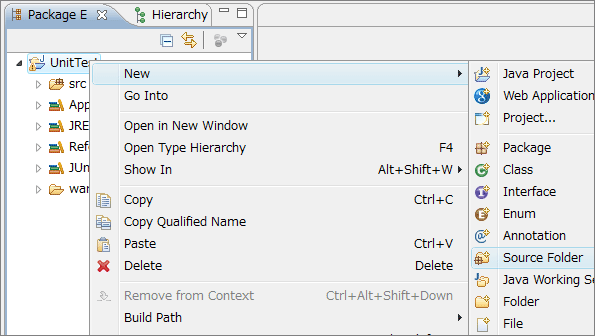
[プロジェクト名]を右クリックして[New]-[Source Folder]を選択して下さい。
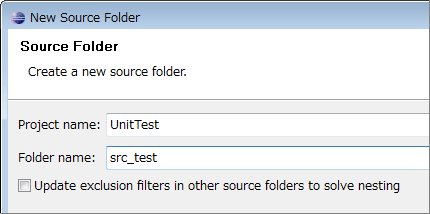
[Folder name:]にsrc_testと入力し、[Finish]ボタンを押して下さい。
すると、プロジェクトにsrc_testというソースフォルダーが追加されるので、そちらに、com.daisukeyamashita.test.unitパッケージを作成して以下のクラスを追加して下さい。
com.daisukeyamashita.test.unit.TestEnvironment クラス
package com.daisukeyamashita.test.unit;

import com.google.apphosting.api.ApiProxy;

import java.util.HashMap;
import java.util.Map;

class TestEnvironment implements ApiProxy.Environment {
    public String getAppId() {
        return "test";
    }

    public String getVersionId() {
        return "1.0";
    }

    public String getEmail() {
        throw new UnsupportedOperationException();
    }

    public boolean isLoggedIn() {
        throw new UnsupportedOperationException();
    }

    public boolean isAdmin() {
        throw new UnsupportedOperationException();
    }

    public String getAuthDomain() {
        throw new UnsupportedOperationException();
    }

    public String getRequestNamespace() {
        return "";
    }

    public Map getAttributes() {
        return new HashMap();
    }

    public String getDefaultNamespace() {
        return null;
    }

    public void setDefaultNamespace(String namespace) {

    }
}
com.daisukeyamashita.test.unit.MailSenderTest クラス
package com.daisukeyamashita.test.unit;

import java.io.File;

import com.google.appengine.api.mail.dev.LocalMailService;
import com.google.appengine.tools.development.ApiProxyLocalImpl;
import com.google.apphosting.api.ApiProxy;

import junit.framework.TestCase;

public class MailSenderTest extends TestCase {

    @Override
    public void setUp() throws Exception {
        super.setUp();
        ApiProxy.setEnvironmentForCurrentThread(new TestEnvironment());
        ApiProxy.setDelegate(new ApiProxyLocalImpl(new File(".")) {
        });
    }

    @Override
    public void tearDown() throws Exception {
        ApiProxy.setDelegate(null);
        ApiProxy.setEnvironmentForCurrentThread(null);
        super.tearDown();
    }

    public void testSendMail() {
        ApiProxyLocalImpl proxy = (ApiProxyLocalImpl) ApiProxy.getDelegate();
        LocalMailService mailService = (LocalMailService) proxy.getService("mail");
        mailService.clearSentMessages();

        MailSender.sendMail("test@example.com", "test-user");

        assertEquals(1, mailService.getSentMessages().size());
    }
}

