





イラストではじめる「Kubernetesでのアプリケーション開発」~CIOps・GitOpsを活用したクラウドネイティブなCI/CD
イラストではじめるKubernetes 第4回

ぷちコラム:Custom Resource Definition、Custom Resource そしてCustom Controller
Argo CDの説明でさらっと「Custom Resource」という単語が出てきましたが、ここではもう少し詳しく説明したいと思います。
Kubernetesが多くの企業で活用されている理由の1つに、拡張性の高さがあげられます。これまでPodやDeployment、Serviceなどのリソースについて説明してきましたが、Kubernetesが標準で用意しているリソースでは足りないことがでてきたとします。この時作成する独自リソースが「Custom Resource(CR)」となり、CRを作るために必要な定義が「Custom Resource Definition(CRD)」です。また、CRを利用してReconcileを行うこともできます。このときReconcileの実装が必要になりますが、この「CRをReconcileするプログラム」を「Custom Controller(Controller)」と言います。
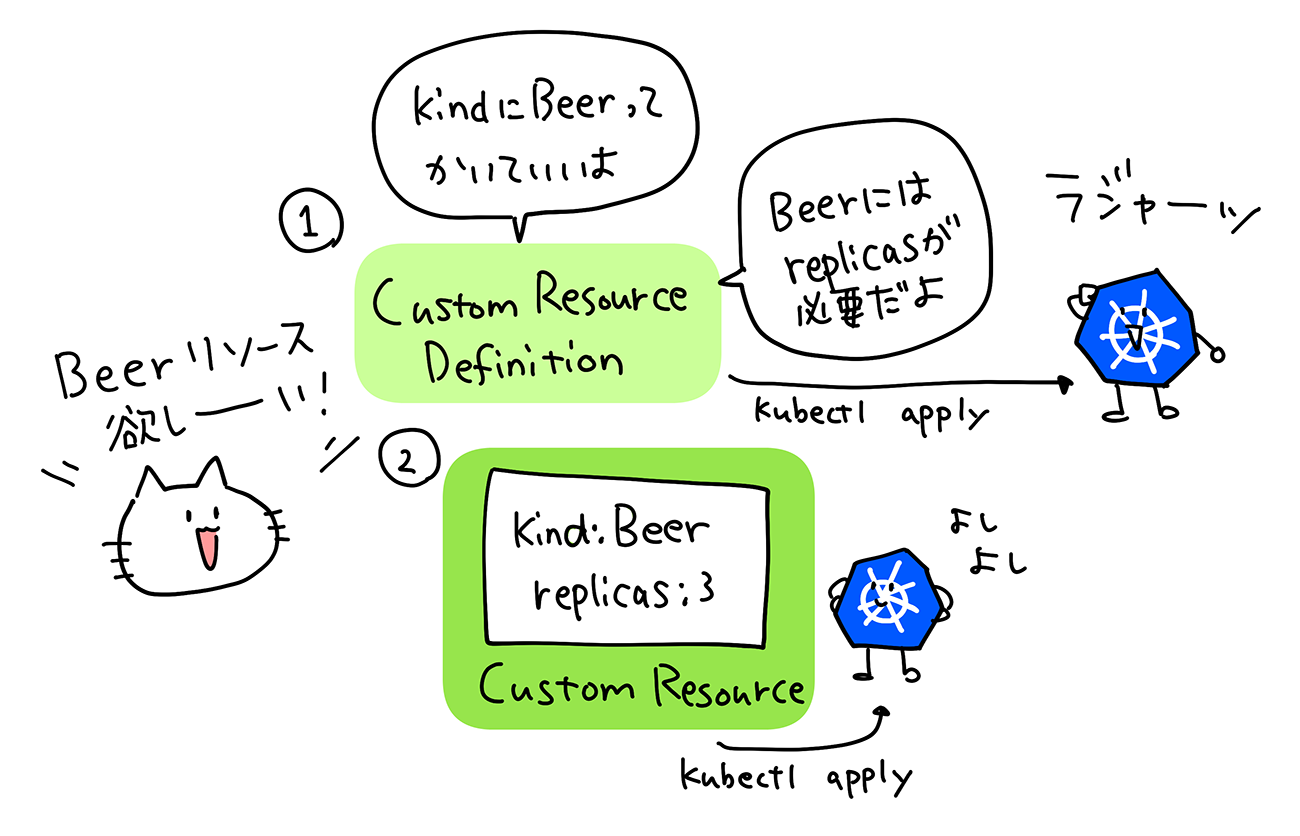
この仕組みを使ってBeerというCRを作ってみましょう。
1. CRDを以下のように定義し、クラスタに適用します。
cat << EOF | kubectl apply -f -
apiVersion: apiextensions.k8s.io/v1
kind: CustomResourceDefinition
metadata:
  # name must match the spec fields below, and be in the form: <plural>.<group>
  name: beers.stable.example.com
spec:
  # group name to use for REST API: /apis/<group>/<version>
  group: stable.example.com
  # list of versions supported by this CustomResourceDefinition
  versions:
    - name: v1
      # Each version can be enabled/disabled by Served flag.
      served: true
      # One and only one version must be marked as the storage version.
      storage: true
      schema:
        openAPIV3Schema:
          type: object
          properties:
            spec:
              type: object
              properties:
                replicas:
                  type: integer
  # either Namespaced or Cluster
  scope: Namespaced
  names:
    # plural name to be used in the URL: /apis/<group>/<version>/<plural>
    plural: beers
    # singular name to be used as an alias on the CLI and for display
    singular: beer
    # kind is normally the CamelCased singular type. Your resource manifests use this.
    kind: Beer
EOF
2. CRを以下のように定義し、クラスタに適用します。
cat << EOF | kubectl apply -f -
apiVersion: "stable.example.com/v1"
kind: Beer
metadata:
  name: i-need-beer
spec:
  replicas: 3
EOF
3. Beerがデプロイされていることを確認しましょう!
$ kubectl get beer
NAME          AGE
i-need-beer   8m19s
Controllerの実装はここでは説明しませんが、実装次第ではBeerのreplicasに応じてPodを作成する、ということができるようになります。
また、CRDとControllerをまとめて「Operator」と呼びます。本文中に説明したArgo CDのように世の中には色々なOperatorが開発されています。Operator HubというサイトでOperatorがまとめられていますので、興味があればチェックしてみてください。
この記事は参考になりましたか?
既に会員の方はを行ってください。
- イラストではじめるKubernetes連載記事一覧
-
- イラストではじめる「Kubernetesで本番運用」~可観測性のあるシステムの実現と、さま...
- イラストではじめる「Kubernetesでのアプリケーション開発」~CIOps・GitOp...
- イラストではじめる「Kubernetesの動かしかた」~Kubernetesクラスタを用意...
- この記事の著者
-

あおい(アオイ)
大手メーカーにてソフトウェアエンジニアエンジニアを経て2019年7月サイボウズ株式会社にSREとして入社。 現行インフラ基盤上のアプリケーションを新インフラ基盤(Kubernetes)に移行するプロジェクトが主な仕事です。著書は、「まんがではじめるKubernetes」など。
※プロフィールは、執筆時点、または直近の記事の寄稿時点での内容です

この記事は参考になりましたか?
この記事をシェア
